
AI for Solopreneurs: Let the Admin Run in the Background So You Can Sell
Which admin jobs to hand off first, how to build each one as a loop that runs quietly instead of operating the tool every day, what you still check, and what three solo founders say it gave them back.


Via a16z: Charts of the Week: Learning to Weld (20 March 2026). Updated October 31, 2026.
AI for solopreneurs works best when you barely notice it. The enquiry gets answered, the call gets booked, the invoice goes out and the late payer gets a reminder, and you never opened a tool to make it happen. You only hear about the cases that need you.
When you work alone, every hour of admin is an hour not spent finding clients or doing paid work. This guide covers which admin jobs to hand off first, how to set each one up so it runs quietly, what you still check, and what three solo founders say it gave them back.
Why so many solo businesses need this
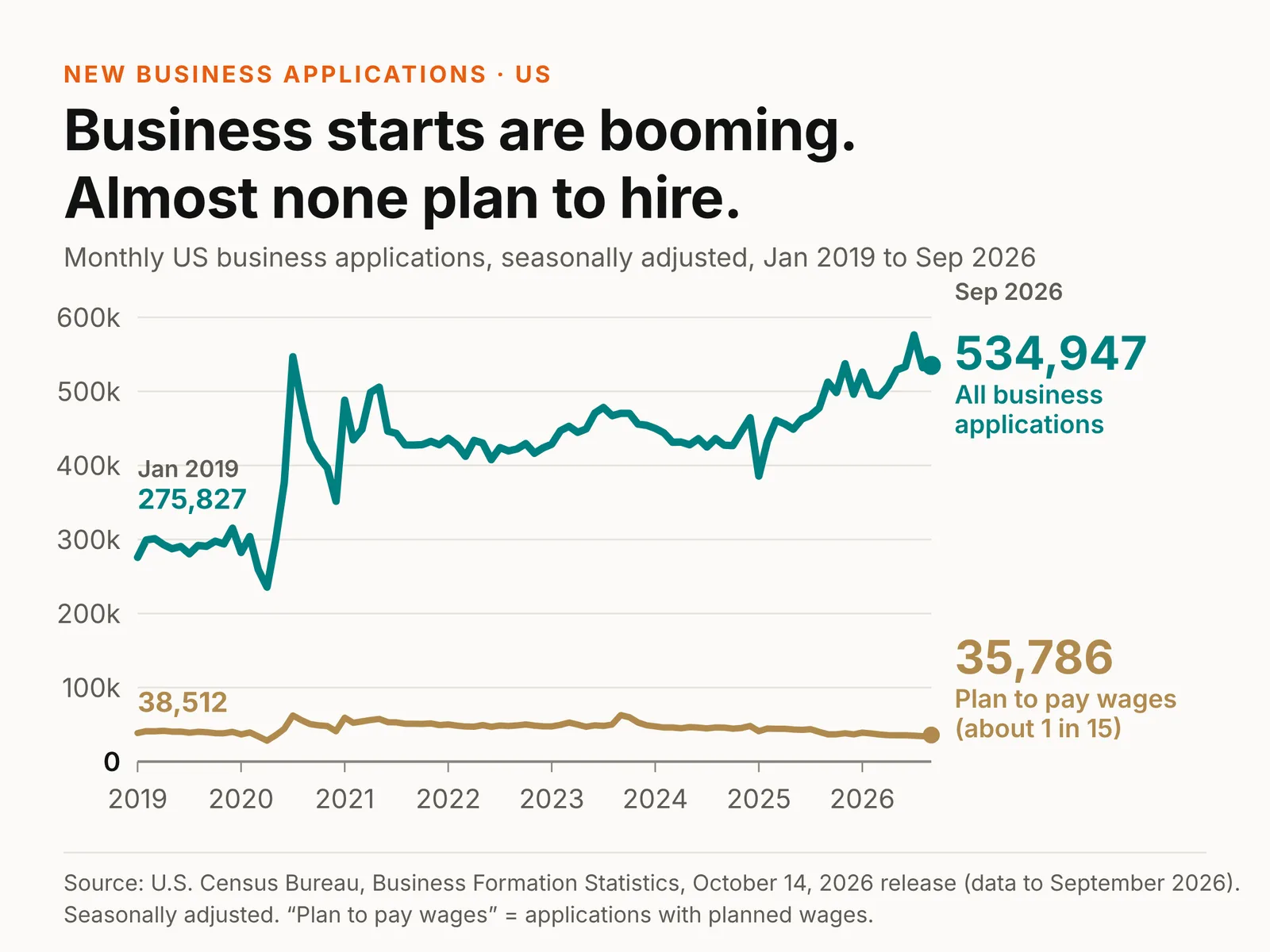
Most new businesses start as one person, and most stay that way. In September 2026, the Census Bureau counted 534,947 US business applications, seasonally adjusted. Only 35,786, about one in fifteen, said they planned to pay wages. Nobody has proven AI is the cause. But with no staff, the owner is the back office unless software takes the routine part.
The admin jobs to hand off first
Start with work that repeats weekly, follows the same steps and is cheap to get wrong. For most one-person service businesses:
- Intake. A form asks every enquiry the same questions and sends a reply straight away. You read a short summary, not a long email thread.
- Scheduling. A booking link replaces the back-and-forth over times. Reminders go out on their own.
- Invoicing and chasing. The invoice goes out when the job is marked done. Polite reminders go out on a set schedule. You only step in when someone is well overdue.
- Follow-ups. A quote that gets no reply triggers a drafted nudge after a few days. You approve it or let it send.
- Bookkeeping prep. Receipts get captured and bank transactions sorted into categories, so month-end is a review, not a weekend.
- Inbox triage. Newsletters, receipts and notifications get filed. Client mail and new enquiries stay on top.
Pick one. Get it running quietly. Then move to the next.
Stop operating the tool. Build the loop.
Most solo founders use AI as operators. Open the chat, paste the email, ask for a reply, copy it back, check it, send it, then repeat. You are still doing the job; the AI just types faster.
Builders write down the trigger, the inputs, the steps and the one point where they approve, once. Then the job runs without them.
To paraphrase Proton’s CTO: “Your job is not to use agents to help you write code. Your job is to lead the agents to help them write code.” Swap “code” for invoices, replies or bookings and it holds for any owner.
James Cortada, who spent 38 years at IBM, frames modern firms as “giant information-processing machines” in Information and the Modern Corporation (MIT Press). That processing used to be people’s work. Now agents can do most of it, cheaper and faster, while you make the calls. Your job is to design how yours runs, not to type into it.
One admin loop looks like this:
Invoice passes its due date → software checks whether it’s paid → AI drafts a polite reminder from your template → you approve it with one click → it sends and logs the date.
Here is how to set each one up.
How to set up each job so it runs in the background
A one-person business keeps its process in one head, which is why AI struggles with it. Use the same four steps for every job:
- Write the steps down. What starts it, what gets checked, what gets sent and what “done” looks like. Use last week’s sent mail and calendar, not memory.
- Mark the one decision. Most admin jobs have a single point where someone has to judge something: a quote amount, a refund, a client who is unhappy. That point stays with you.
- Give the rest to a tool. Drafting the reply, filling the invoice and setting the reminder can go to software.
- Set it to show you exceptions only. The goal is a short list of things that need you: an enquiry that doesn’t fit, an invoice 30 days late, a reply the tool wasn’t sure about. Everything else just happens.
Check its work closely for the first two weeks. If you are still rewriting most of what it produces, the written steps aren’t clear enough yet. Fix the steps, not the tool.
Our process audit checklist is a structured version of steps 1 and 2. Writing steps down is the same discipline as an SOP, covered in our piece on AI SOPs.
What you still check
- Anything with money or legal weight. Quotes, contracts and refunds stay with you.
- New templates. Read them before they go out unattended.
- The exception list. Look at it once a day. It should take minutes.
- Expert work. If a tool gives you legal, tax or technical advice, a qualified person still checks it.
What three solo founders handed off
These are first-person accounts given to Business Insider. The time savings are the founders’ own estimates, not measurements.
Justin Parnell, San Francisco: intake, proposals and invoices. Parnell runs a one-person business building AI agents. He told Business Insider that when someone fills in the form on his website, they get a tailored road map and a meeting link. After the call, an agent updates the proposal from the conversation, and billing workflows send the invoice. He says that without this he would probably need to hire two more people or contract outside help.
Christina Puder, Madrid: a client task from an hour to a minute. Puder coaches product managers. She says she automated a service she sells, finding jobs that match each client’s criteria. It took about 60 minutes a day per client and now takes about one minute, by her account. She also built her website with Lovable, an AI coding tool, and still pays a part-time engineer when it hits a bug she can’t fix.
Aaron Sneed, Florida: about 15 agents, and a lawyer who still checks. Sneed runs a defense-tech business on his own. He describes around 15 custom agents covering HR, finance, legal, engineering and more, and says they save him about 20 hours a week. He also says each agent took about two weeks to train to a level he trusted, and that his lawyer caught advice from the legal agent that was right on the facts but wrong for the case.
Each handed off jobs that repeat, with clear inputs and an obvious finished result. None handed over judgement. The admin moved out of sight, and the day went back to clients.
AI tools for solopreneurs, by task
Pick by the job you wrote down, not by the longest feature list. These are well-known examples, not endorsements, and BuildBrain doesn’t sell any of them. Check current plans and data terms on each vendor’s own site.
- Drafting replies, proposals and posts: a general AI assistant such as ChatGPT, Claude, Gemini or Microsoft Copilot.
- Intake and booking: a form plus a scheduler, for example Google Forms or Typeform with Calendly.
- Invoicing and reminders: accounting or payment software such as QuickBooks, FreshBooks, Xero or Stripe Invoicing, which can send invoices and scheduled reminders.
- Bookkeeping prep: bank feeds and receipt capture in the same accounting software, or a receipt tool such as Dext.
- Inbox triage: filters and labels in Gmail or Outlook, plus the AI assistant built into each.
- Joining the steps: automation tools such as Zapier or Make, which pass a new form entry to your calendar, your CRM and your invoice.
For a wider guide that matches tasks to types of AI, see best AI for business.
Spend the time you get back on business development
Quiet admin only pays if the hours go somewhere. Decide in advance: calling past clients, following up warm leads, asking for referrals, writing the proposal you keep putting off. Book that time like a client meeting, or it fills with more admin.
Just starting out? Run your first few clients by hand and note every step. AI runs a process you can describe; it can’t invent one that fits your clients.
If the steps keep needing your judgement, that points to a first hire, not more software.
Our AI readiness assessment checks whether a job is written down well enough for AI to run it. If you want help mapping it, our process mapping service starts with one loop. Solo law practices face the same gap: see solo firms and AI revenue.
Tell Ada which admin job eats your week. She will send back a free one-page sketch of how it could run in the background at /audit/.
Frequently asked questions
How can AI help a solopreneur?
Mostly by running the admin in the background: answering enquiries, booking calls, sending invoices and reminders, drafting follow-ups, sorting receipts and filing the inbox. Done well, you only see the cases that need a decision, and your hours go to clients and finding new work.
What should a solopreneur automate first?
The job that repeats every week, follows the same steps and is cheap to get wrong. Intake replies, booking, invoice reminders and quote follow-ups are common first picks. Keep quotes, contracts and anything with legal weight with you.
How do I run AI without spending all day on it?
Write each job down as steps, mark the one decision that stays with you, give the rest to a tool, and set it to show you exceptions only. Check its work closely for the first two weeks. After that, a short daily look at the exception list should be enough.
What AI tools does a solopreneur actually need?
Fewer than most lists suggest: one assistant for drafting, a form and scheduler for intake, accounting software that sends invoices and reminders, and optionally an automation tool such as Zapier or Make to join them. Add tools one job at a time.
Can you run a business alone with AI?
Many people are trying. In September 2026, only about one in fifteen US business applications said they planned to pay wages, according to the Census Bureau. Solo founders interviewed by Business Insider use AI for intake, proposals, invoicing and research, but still bring in a lawyer or engineer when the work needs expert judgement.
Do I need to learn to prompt AI to run my business?
Not much. Clear instructions help, but the bigger gain comes from designing the loop: what starts the job, what information it needs, which steps run and where you approve. Set that up once and you stop typing into a chat for every email and invoice.
Sources: a16z, Charts of the Week: Learning to Weld, 20 March 2026; U.S. Census Bureau, Business Formation Statistics, September 2026 (released 14 October 2026, seasonally adjusted; the chart at the top uses the monthly time series); Business Insider as-told-to essays: Justin Parnell (3 March 2026), Christina Puder (21 February 2026) and Aaron Sneed (13 February 2026). Time savings are the founders’ own estimates. Updated October 31, 2026: refocused on AI for solopreneurs, with the latest Census figures, three named solo founders, a how-to for handing off admin, a tool-by-task list and an FAQ. Unsupported claims from the July version were removed.; James W. Cortada, Information and the Modern Corporation, MIT Press (publisher’s description)
Similar Articles




What does AI really cost a small firm? Run the calculator →
AI automation agency for small firms →
Business process mapping examples →
Microsoft Copilot cost for a small business →
AI consulting services for small business →
Free AI readiness assessment →
Pilot purgatory: the 90-day AI proof of concept test →